Quality commercial ovens since 1977

  • Company
    • The story
    • Career
    • Events
    • HOUNÖ press hub
  • Industry
    • Bakery
    • Supermarkets & retail kitchens
    • Canteens & catering kitchens
    • Butcher & charcuterie
    • Restaurants
    • Healthcare institutions
    • Petrol stations
    • Quick Service Restaurants
    • School kitchens
    • Pubs
  • Smart tools
    • Invoq ROI calculator
    • Invoq ServiceApp
    • Invoq CLOUD Solution
  • News
  • Contact
    • Contact HOUNÖ team
    • Find dealer & service partners
  • English
    • Danish
    • French

The cart is empty

Shop
  • Ovens & options
    • HOUNÖ ovens overview
    • Invoq Combi & Hybrid
    • Invoq Bake
    • Invoq Essence
    • Invoq miniCombi
    • HOUNÖ Figaro
  • Oven accessories
    • Accessories online shop
    • HOUNÖ oven care products
    • Trays, sheets & grills for HOUNÖ ovens
  • Services
    • Combi end-user
    • Culinary support
    • Commercial kitchen design
    • Technical support
    • Spare parts
    • Warranty
    • Manuals
    • FAQ
  • Company
    • The story
    • Career
    • Events
    • HOUNÖ press hub
  • Industry
    • Bakery
    • Supermarkets & retail kitchens
    • Canteens & catering kitchens
    • Butcher & charcuterie
    • Restaurants
    • Healthcare institutions
    • Petrol stations
    • Quick Service Restaurants
    • School kitchens
    • Pubs
  • Smart tools
    • Invoq ROI calculator
    • Invoq ServiceApp
    • Invoq CLOUD Solution
  • News
  • Contact
    • Contact HOUNÖ team
    • Find dealer & service partners
  • English
    • Danish
    • French

Hounö blog

Customizing the user interface for efficiency and ease 

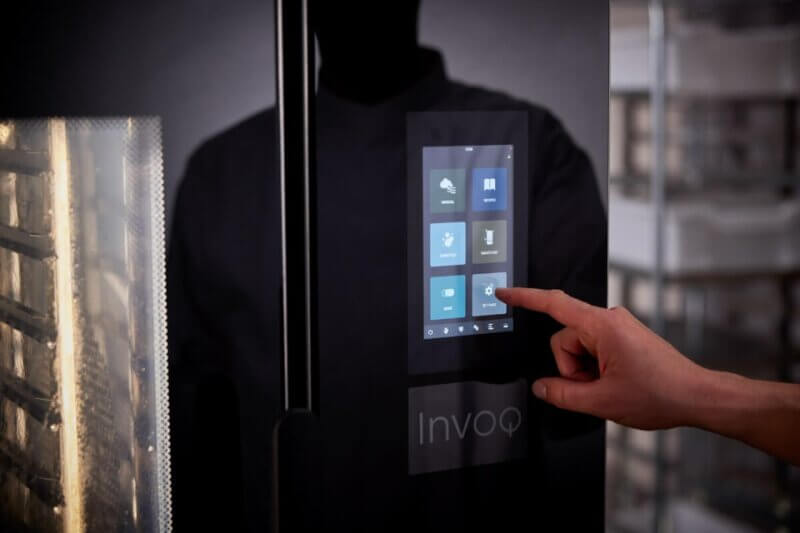
Customize the Invoq oven’s SmartTouch interface to streamline workflows and ensure consistency. Lock the UI for controlled cooking, create tailored home screens for quick access, and add shortcuts to essential functions. These features enhance efficiency, reduce errors, and maintain high-quality results.

KVICKLY_040[1]
News
/
customizing the user interface for efficiency and ease 
Del
Share on facebook Share on linkedin Share on twitter
19 March 2025

The Invoq oven is designed with user-friendly customization in mind, allowing chefs and kitchen teams to tailor the interface to their specific needs. Whether you want quick access to frequently used recipes, a locked screen for consistency, or shortcuts for essential functions, the Invoq oven’s SmartTouch panel gives you full control. 
Why customize the user interface? 

Customizing the user interface (UI) of your Invoq oven can significantly improve kitchen efficiency, enhance workflow, and reduce errors. Key benefits include: 

Faster operations
Save time with preset shortcuts and a personalized home screen.
Consistency across staff
A locked UI ensures the same high-quality results, regardless of who operates the oven.
Reduced mistakes
Eliminate accidental recipe edits and unauthorized changes.
Streamlined workflow
Quick access to frequently used recipes and functions minimizes downtime.

Now, let’s explore how you can tailor the Invoq oven UI to fit your kitchen’s needs:

1. Locking the user interface for consistency 

For kitchens that require strict control over cooking settings, Invoq offers a locked UI mode. When activated, only predefined recipes and settings are available, preventing any unauthorized changes. 

How to lock the UI: 

  1. Navigate to Settings from the home screen. 
  2. Select General Settings → Startup and User Profile. 
  3. Choose Startup Permission and set it to User mode. 
  4. Restart the oven to activate the locked interface. 

*In locked mode, access to manual settings and recipe editing is restricted, ensuring all team members follow the same cooking process. 

2. Creating and managing home screens 

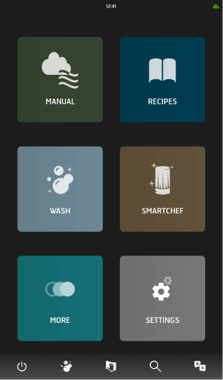
With Invoq, you can create multiple custom home screens to suit different menu categories, cooking stations, or shift preferences

How to customize your home screen: 

  1. Go to Settings → General Settings → Startup and User Profile. 
  2. Select Home Screen and choose from options like: 
    • Favorites: Quick access to your most-used recipes. 
    • Recipes: A full overview of available cooking programs. 
    • MenuPlanner: Ideal for multi-dish cooking. 
    • QSR Mode: A simplified interface designed for high-speed, consistent cooking. 
  3. Arrange, rename, or delete shortcuts to create a streamlined view that fits your workflow. 

*Think of this feature as setting up an organized digital menu for your kitchen team, ensuring seamless operations.  
3. Creating shortcuts for quick access 

You can customize the menu bar at the bottom of the display to include shortcuts to the most frequently used functions. 

How to add shortcuts: 

  1. Go to Settings → General Settings → Menubar Setup. 
  2. Select an empty shortcut slot. 
  3. Choose from options like: 
CareCycle (cleaning programs)
Preheat & Cool down
Start up timer
Draining function
HACCP data export

4. Save settings

*This feature ensures you do not have to navigate multiple menus to perform essential tasks, speeding up daily operations. 

4. Using QSR mode for high-speed, controlled cooking 

The QSR (Quick Select Recipes) mode is designed for fast-paced kitchens where consistency is crucial. It allows you to predefine menus and lock the interface to prevent unauthorized changes

How to activate QSR mode: 

  1. Go to Settings → General Settings → Startup and User Profile. 
  2. Select QSR as the home screen
  3. Restart the oven to apply the changes. 

Key features of QSR mode:  

Preset recipes only
No manual changes allowed.  
No recipe editing:
Prevents accidental modifications.  
Locked UI
Ensures all team members follow the same process.  
Food safety compliance
HACCP data is stored and can be downloaded as a PDF. 

*Perfect for chains and large-scale operations, ensuring uniform cooking across multiple locations. 

Watch to learn about HACCP here

Explore more Invoq ovens here

See all
The Invoq Combi 6-1/1 GN is designed to bring advanced cooking performance into a compact footprint. With capacity for up to 7 trays and increased productivity, it supports consistent results and efficient workflows — ideal for kitchens where space and performance are equally important.
Invoq Combi 6-1/1 GN
The Invoq Hybrid 6-1/1 GN is designed to simplify advanced cooking with intelligent sensors and precise climate control, ensuring consistent, high-quality results across every tray. With a 7-tray 1/1 GN capacity and efficient operation, it supports streamlined workflows while minimizing energy and water consumption.
Invoq Hybrid 6-1/1 GN
Commercial Invoq baking oven with glass doors on both sides, allowing visibility through the oven and supporting hygienic bakery workflow separation
Invoq Bake 6-400×600 EN PassThrough
The Invoq Bake 6-400×600 EN is designed for professional baking with optimized airflow and increased rack spacing, ensuring even heat distribution and consistent results on every tray. Its intuitive operation and efficient cleaning support streamlined workflows while minimizing energy and water consumption.
Invoq Bake 6-400×600 EN
Commercial Invoq pass-through combi oven with dual glass doors, designed to minimize cross-contamination by separating clean and dirty workflow zones
Invoq Combi 6-1/1 GN PassThrough
Invoq combi oven with glass doors on both sides, supporting hygienic pass-through cooking and helping prevent cross-contamination
Invoq Hybrid 6-1/1 GN PassThrough
The Invoq Bake 9-400×600 EN is designed for professional baking with 9-tray capacity and optimized airflow to ensure even, consistent results across every rack. Intelligent controls and automated cleaning support efficient workflows while reducing energy and water consumption.
Invoq Bake 9-400×600 EN
Invoq Combi 10-1/1 GN combi oven delivers reliable, high-capacity performance with intelligent control and consistent results. This oven is ideal for professional kitchens managing multiple dishes at once.
Invoq Combi 10-1/1 GN
Invoq Hybrid 10-1/1 GN combi oven combines boiler and injection steam to deliver powerful, high-density steam and precise climate control, ensuring consistent, high-quality results across multiple dishes—while optimizing energy and water consumption in professional kitchens.
Invoq Hybrid 10-1/1 GN
Invoq pass-through baking oven with glass doors, offering full visibility through the baking chamber for front baking and efficient bakery workflow
Invoq Bake 9-400×600 EN PassThrough
Del
Share on facebook Share on linkedin Share on twitter

Guides and Inspirations

Customizing the user interface for efficiency and ease 

Customize the Invoq oven’s SmartTouch interface to streamline workflows and ensure consistency. Lock the UI for controlled cooking, create tailored home screens for quick access, and add shortcuts to essential functions. These features enhance efficiency, reduce errors, and maintain high-quality results.
Read more
KVICKLY_040[1]
hounö logo

    HOUNÖ newsletter

    Sign up for our newsletter. Be the first one to get the latest updated about our products, services, cooking tips & tricks, industrial trending topics and more.

    Company

    • Career
    • Events
    • Contact
    • Locate partners

    Products

    • Combi & Bake ovens
    • Spare parts

    Technical

    • Technical support
    • Invoq CLOUD Solution
    • Warranty
    • FAQ

    Culinary

    • News
    • Culinary support
    • Recipes
    facebook youtube linkedin instagram
    © Copyright 2026 HOUNÖ VAT: 82557210 Alsvej 1 8940 Randers, Denmark +45 8711 4711 houno@houno.com
    • Legal terms of sales and delivery
    • Part of the Middleby Corporation
    • Cookie & Privacy Policy