
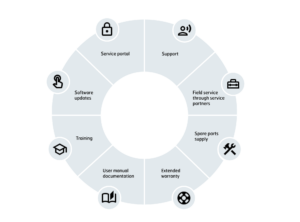
At HOUNÖ, we offer a variety of services suiting your needs.
Get peace of mind knowing we take care of any technical issue you might have in the future.
Contact us if you need help
You may also contact us directly via:
Phone: +45 8711 4711
E-mail: techsupport@houno.com
Opening hours:
Monday to Thursday: 08:00 a.m. to 16:00 p.m.
Friday: 08:00 a.m. to 15:30 p.m.
We will do our best to get back to you within 24 hours.
If you have bought our HOUNÖ ovens from local dealers, please contact them directly.
If you need help to find the local dealer / service support, submit your request via the contact form here
HOUNÖ service portal
Technical training
Understand the serial number

Frequent Asked Questions about HOUNÖ technical support services
A white coating may indicate limescale or soap residue.
- First, check your HydroShield water filter – if it’s exhausted, replace it.
- Run a descaling cycle using approved HOUNÖ descaler (CareCycle Descale for Invoq, Suma Dalc D5 for Visual Cooking and CombiSlim).
If the issue persists, please contact your local HOUNÖ service partner for assistance.
Reduced steaming output can be caused by:
- Limescale build-up on heating elements in the steam generator
- Defective heating elements in boiler – or if Combi oven the oven heating elements
- An overused water filter can result in lime scale build up
To resolve:
- Check and replace the HydroShield filter, if needed
- Descale the steam generator or oven cavity using CareCycle Descale
If the issue continues, please reach out to your local HOUNÖ service partner. mize downtime.
Use the faultfinding manual to identify and resolve the error.
You can access the latest manuals on our manual page.
If the error persists or requires service-level access, please contact your HOUNÖ service partner.
The serial number is located on the rating plate, which can typically be found:
- On the right side of the front in the lower corner (CombiSlim & Invoq Visual Cooking)
- On the side plate on the right-hand side of the oven (Invoq)
Refer to the oven’s installation or user manual for an exact illustration.
You can determine the age of your oven from the serial number, found on the rating plate.
Example: Serial number 210409-056206
- 21 = Year of manufacture (2021)
- 04 = Month (April)
- 09 = Day (9th)
The rest of the number is the unique production ID.
We recommend only using original HOUNÖ cleaning products and HydroShield water filters to maintain oven performance and protect your warranty.
Order directly from our official online shop
Important:
- Failure to use a HydroShield filter may void your warranty and cause pitting corrosion.
- Lack of regular cleaning with CareCycle tabs or Detergent Intense liquid may also affect warranty coverage
To protect your oven from limescale and maintain optimal steam performance, the HydroShield water filter must be replaced:
- When the oven display shows “Filter change needed”
- At least once every 12 months
- If the oven has been unused for 4 weeks or more
Replacement steps:
- Turn the old filter clockwise until the filter head comes off
Be cautious—used filters are heavy and filled with water - Remove the new filter from its packaging and take off the hygiene cap
- Write the installation/replacement date on the filter
- Insert the new filter and turn it anticlockwise into the filter head
- Reset the water filter via the oven’s settings (see “Setting the HydroShield water filter” in the user manual)
Always ensure your water meets HOUNÖ’s specified quality standards, as outlined in the installation manual.
There are two ways to update software on your Invoq Combi or Invoq Hybrid oven – online or via USB stick, depending on your oven’s software version and internet connection.
If your oven is online and running software version 0.7.59 or later:
- Go to Settings > Software Update
- Tap Check online for new software
- Follow the on-screen instructions to install or postpone the update
Accessible in both Superuser and Technician mode
If your oven is offline or has an older software version:
You’ll need to use a USB stick:
- Insert a USB stick and go to Settings > Software Update > Test USB stick
- Tap Setup to prepare the folders on the stick
- Download the latest software from the Invoq Asset Library
- Save the two .zip files to the folder: \Invoq\PlatformUpdate\
Note: Do not unzip the files - Insert the USB stick into the oven
- Log in as Technician (password: 576021)
- Navigate to Settings > Software Update > Update device
- Confirm and begin the update
Takes approx. 10 minutes. Do not interrupt the update process.
If in doubt, refer to the service manual.
For SmartTouch ovens, updates can be made via USB stick.
You can download the latest software from the HOUNÖ Portal. Always follow the instructions in the software update manual for safe installation.
This message usually means the door sensor needs calibration. You can easily do this via the oven’s touch panel:
- Tap Settings (top right corner)
- Go to Super User
- Select Calibrate > Calibrate front door
- Tap Start calibration and follow the instruction on the screen
The oven will recalibrate the door sensor. If the error continues, contact your HOUNÖ service partner.
To ensure hygiene, performance, and long oven life, you should run a CareCycle cleaning program daily—especially after heavy use or preparing high-fat or high-residue foods. The oven will prompt you when cleaning is required. Choose the appropriate program (Eco, Medium, Intense, Turbo) based on your usage.
Common causes include:
- Door not fully closed or uncalibrated
- A faulty temperature sensor
- Power supply issues
- A heating element failure
- Door gasket needs replacement
Check for system messages and run a calibration or cleaning if needed. If the issue persists, contact your HOUNÖ service partner.
First, try a soft restart by powering off the oven for 30 seconds, then turning it back on. If unresponsive:
- Clean the screen with a soft cloth
- Check for visible damage or excess moisture
- Ensure software is up to date
Still unresponsive? Contact your HOUNÖ service partner.
Yes, a factory reset is possible but should only be done by authorized personnel or after consulting HOUNÖ support. It will erase saved recipes and settings, so ensure a backup is made if necessary.
This can happen if the probe is:
- Dirty or bent
- Not inserted properly
- Damaged or has a loose connection
Clean the probe and check its position. Replace if damage is visible.
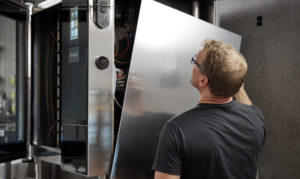
Yes, it is possible to change the door opening direction on Invoq Combi, Invoq Hybrid, and Invoq Bake ovens (excluding roll-in models) without the use of extra parts. This process allows you to switch from a left-hinged to a right-hinged door – or vice versa – depending on your kitchen layout.
The modification should only be carried out by a qualified service technician, and a detailed step-by-step guide is available in the Mounting Instruction: Changing Oven Door Opening Direction.
You can find the full instructions here or contact HOUNÖ Technical Support for assistance.
For roll-in models, these can be ordered right-hinged from factory.
Steam generator calibration is relevant for Invoq Hybrid ovens only. This process ensures optimal steam performance and takes just a few minutes to complete.
To calibrate:
- Go to Settings on the oven’s touch display
- Select Oven setup
- Tap Calibration
- Choose Calibrate steam generator
- Press Start calibration and follow the on-screen instructions
Note: Always ensure the oven is in standby mode before starting calibration.
If in doubt, refer to the user manual or contact your HOUNÖ service partner.
Calibrating the oxygen sensor ensures accurate humidity regulation during cooking.
To perform the calibration:
- Go to Settings on the oven’s touch display
- Select Oven setup
- Tap Calibration
- Choose Calibrate auto humid.
- Ensure the oven is cold (below 60°C) and dry, and open the oven door
- Press Start and let the calibration run
Note: The process takes a few minutes and cannot be interrupted.
Refer to the user manual for detailed guidance or contact your HOUNÖ service partner if needed.
Door calibration ensures your Invoq oven registers door position correctly, which is critical for safe and effective operation.
To calibrate the operator door:
- Close the operator door (and the service door if using a PassThrough oven)
- Go to Settings > Oven setup > Calibration
- Select Calibrate operator door
- Press Start calibration and follow the steps shown on the screen
To calibrate the service door (only for PassThrough models):
- Close both the operator and service doors
- Navigate to Settings > Oven setup > Calibration
- Select Calibrate service door
- Press Start calibration and follow the on-screen guide
Refer to the user manual for complete step-by-step instructions or contact your HOUNÖ service partner for assistance. r if needed.
Easy to order with fast delivery worldwide
